 MémoPatte
How do I export my health record, and import it again?
In MémoPatte, open Settings › My data › Marker 1“Export my data”, then choose a format:
- JSON: your whole health record, to import it into MémoPatte again.
- CSV: to open it in a spreadsheet.
You can save the file to your phone, in Documents › MémoPatte, or share it (Google Drive, email…).
Just below, Settings › My data › Marker 2“Export to PDF” creates a PDF of the health record of all your pets or just one, to print or show. Exports are free and don’t need an account. Photos aren’t exported.
To import a JSON export again: Settings › My data › Marker 3“Import a MémoPatte export”. If data already exists on the phone, choose “Merge” (adds what isn’t in your current data yet) or “Replace” (replaces all your current data, after you confirm). MémoPatte then schedules your reminders again.
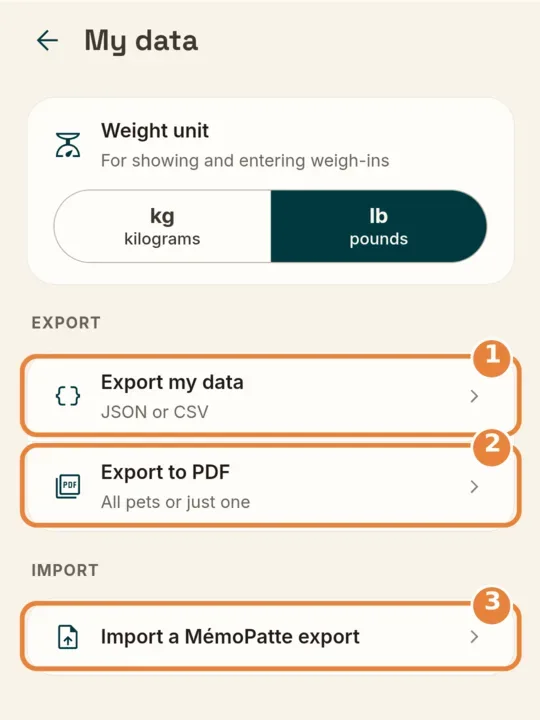
- Marker 1“Export my data”
- Marker 2“Export to PDF”
- Marker 3“Import a MémoPatte export”
Didn’t help? Email us at [email protected].