 MémoPatte
How do I erase all of MémoPatte’s data?
Open Settings › Backup › Marker 2“Erase this phone’s data”. MémoPatte first offers to Marker 1export a copy, then asks you to confirm twice. The whole health record is then removed from the phone (pets, treatments, vaccines, weigh-ins and photos), no more reminders go off, and MémoPatte restarts as on its first launch. Exports saved in Documents › MémoPatte stay on the phone. Without a copy, your health record can’t be recovered.
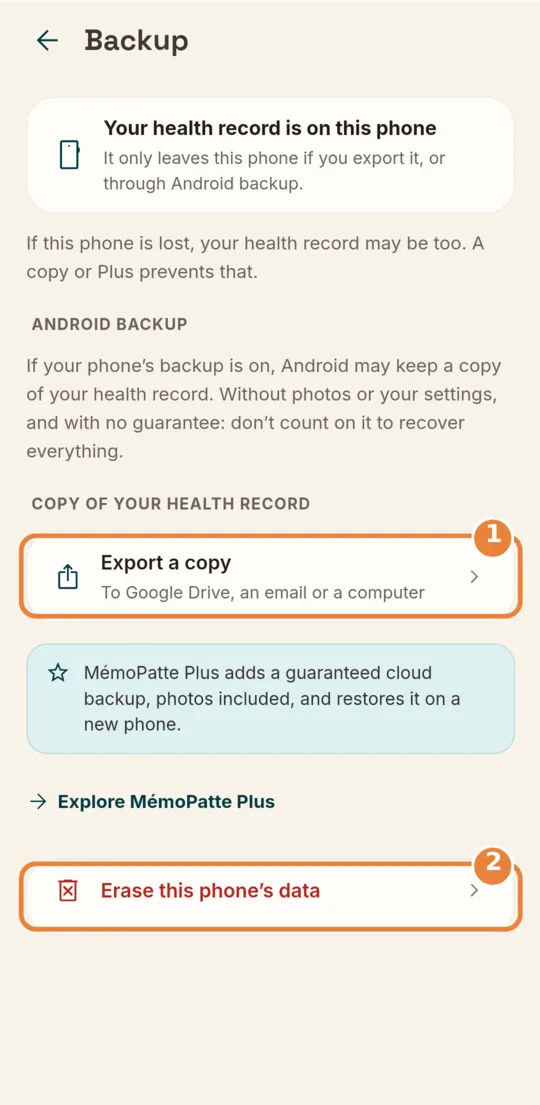
- Marker 1“Export a copy”
- Marker 2“Erase this phone’s data”
Didn’t help? Email us at [email protected].